Payment Methods
Payment Methods
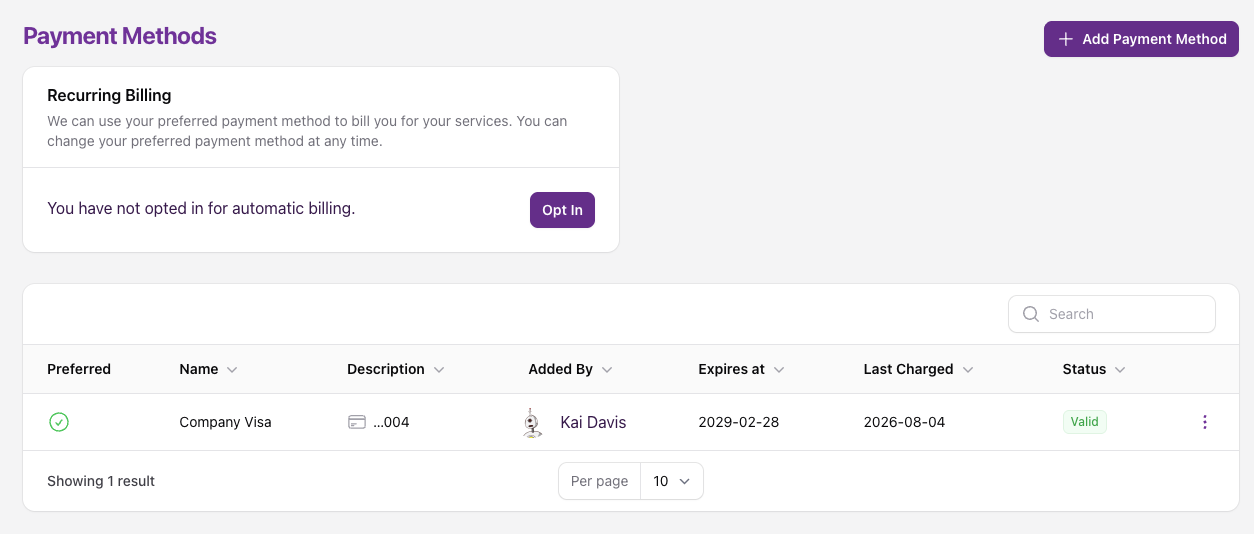
The Payment Methods tab displays all existing payment methods used on your account. All users (except Read Only users) can manage payment methods and opt in or opt out of recurring billing.
Add Payment Method
To add a payment method:
-
Navigate to the Payment Methods page and click the Add Payment Method button:
-
Enter your credit card or PayPal details and click Create.
- This payment method will be your preferred payment method until changed manually.
- You can have up to 3 valid payment methods on your account at a time, the green tick denotes which one is preferred.
Change Preferred Payment Method
To change your preferred payment method:
- If you are adding a new payment method, you will have the option to make it preferred on creation.
- If you are changing to an existing payment method, navigate to the Payment Methods page and click the Action Menu to the far right and select Set as Preferred.
- The green tick will now show against the new payment method and a red cross against the previous one.
Recurring billing uses your other payment methods as a backup
Recurring billing charges your preferred payment method first. If that charge fails, we'll automatically try your other valid payment methods as a backup before the invoice becomes overdue.