Recurring Billing
Recurring Billing
Set up Recurring Billing
To set up Recurring Billing:
- You will need to have at least one payment method saved in your account.
-
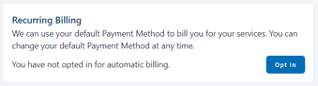
Navigate to the Payment Methods page and click the Opt In button at the top of the page:
-
You will receive an email confirming your changes and we will charge your preferred payment method on the invoice due date and email you a confirmation of payment each month.
Note: if you update your preferred payment method, no changes need to be made to the Recurring Billing set up — it will automatically charge whichever payment method is preferred. If your preferred payment method fails, we'll automatically try your other valid payment methods as a backup.
Cancel Recurring Billing
Note: If you cancel Recurring Billing, you will need to ensure payment is made by bank transfer before the due date.
To cancel your Recurring Billing:
-
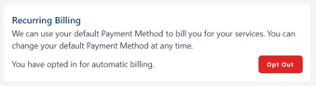
Navigate to the Payment Methods page and click the Opt Out button at the top of the page:
-
No further automatic payments will be collected, any outstanding invoices and all new invoices will need to be settled manually before their due date.